Excelでの使用例
Excelで使用する例をご紹介します。
ブック名とシート名を登録する
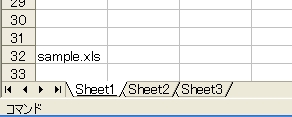
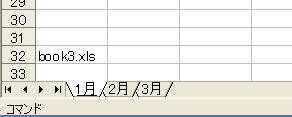
UserFormを表示すると同時に、現在Excelで開いているブックと、そのブックに含まれているワークシートの一覧を表示します。複数のブックを開いた状態で実行するとわかりやすいです。ここでは、下図のようなワークシートを持つ2つのブックを開いているとします。
Private Sub UserForm_Initialize()
    Dim wb, ws
    With TreeView1
        .Indentation = 14
        .LabelEdit = tvwManual
        .BorderStyle = ccNone
        .HideSelection = False
        .LineStyle = tvwRootLines
        .ImageList = ImageList1
        For Each wb In Workbooks
            .Nodes.Add(Key:=wb.Name, Text:=wb.Name, Image:="book").Expanded = True
            For Each ws In wb.Worksheets
                .Nodes.Add Relative:=wb.Name, Relationship:=tvwChild, _
                           Key:=wb.Name & "!" & ws.Name, Text:=ws.Name, Image:="sheet"
            Next ws
        Next wb
    End With
End Sub
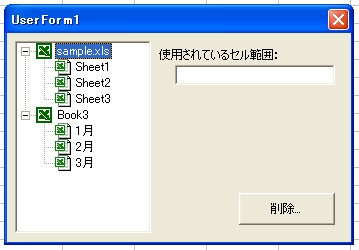
テキストボックス(TextBox1)を1つ追加して、コマンドボタン(CommandButton1)のキャプションを[削除]にしました。これだけでも、何となくこの後の展開が予想できますね。
前半はTreeViewコントロールのプロパティを設定しています。これらは毎回実行しなくても、[プロパティ]ウィンドウで指定してもかまいません。2つのFor Eachステートメント「For Each wb In Workbooks」と「For Each ws In wb.Worksheets」で、開いているすべてのブックと、その中に含まれるすべてのワークシートを取得しています。「For Each wb In Workbooks」では、ブックの名前を親ノードとして登録します。
.Nodes.Add(Key:=wb.Name, Text:=wb.Name, Image:="book").Expanded = True
は「ノードを登録する」と「ノードを展開する」の2処理を1行で実行しています。
.Nodes.Add(Key:=wb.Name, Text:=wb.Name, Image:="book")
でノードを登録していますが、Addメソッドの返り値を利用してExpandedプロパティを操作していますので、引数を括弧で囲っています。登録するノードのKeyにはブックの名前を指定します。引数Keyには重複しない名前を指定しなければなりませんが、Excelでは普通同じ名前のブックを開けませんので重複はしないでしょう。心配性の方は別の手を検討してください。たとえば乱数でランダムな名前を生成するとか。ツリーに表示するTextもブック名です。Imageでアイコンも指定しました。
続いて、ブック内に存在するワークシートを登録します。
.Nodes.Add Relative:=wb.Name, Relationship:=tvwChild, _
           Key:=wb.Name & "!" & ws.Name, Text:=ws.Name, Image:="sheet"
ワークシートの親ノードはブックです。ブックのノードはKeyにブック名を指定しています。For Eachステートメントがネストしていますので、ワークシートを登録する時点では、変数wbにブックが格納されているはずです。そこで、親ノードを示す引数Relativeにはwb.Nameを指定します。
子ノードのKeyにも重複しない名前を指定しなければなりません。しかし「Sheet1」などは複数のブックに存在しそうです。そこで「ブック名!シート名」というKeyを指定します。少なくともブック名は重複しないはずですから大丈夫でしょう。
クリックされたワークシートの情報を得る
ワークシートがクリックされたとき、そのワークシートで使用されているセル範囲をテキストボックス(TextBox1)に表示します。使用されているセル範囲は、ワークシートのUsedRangeプロパティでわかります。Sheet1を調べるのでしたら、
Worksheets("Sheet1").UsedRange.Address
となります。
TreeViewコントロールでクリックされたノードからシート名を取得してプロパティを調べます。ここで問題は2つあります。1つめは、クリックされたノードがブックかシートかを見極めることです。これは「親がいるか」「子がいるか」で判定できます。どちらでもいいのですが、ここではChildrenプロパティの値が「0だったら子=シート」「0より大きかったら親=ブック」と判断します。1つのブックには最低1つのワークシートが存在するはずですから、これで大丈夫でしょう。これで何か不具合が生じたら、そのとき別の手を考えればいいんです。
2つめの問題は、そのシートのブック名も取得しなければならないということです。同じSheet1であっても
Workbooks("Book1").Worksheets("Sheet1")
Workbooks("sample").Worksheets("Sheet1")
では意味が違います。「Worksheets("Sheet1").UsedRange.Address」だけでは、アクティブブックしか調べることができません。クリックされたシートのブック名は、親を調べればわかります。そう、Parentプロパティですね。
Private Sub TreeView1_NodeClick(ByVal Node As MSComctlLib.Node)
    Dim BookName As String, SheetName As String
    If Node.Children = 0 Then
        BookName = Node.Parent
        SheetName = Node
        TextBox1 = Workbooks(BookName).Worksheets(SheetName).UsedRange.Address
    Else
        TextBox1 = ""
    End If
End Sub
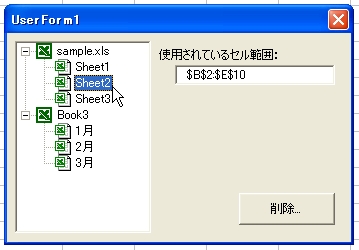
シートを削除する
[削除...]ボタンをクリックしたら、そのシートを削除できるようにします。削除対象のシート名とブック名を取得するやり方は、上記のコードと同じ考え方です。ただし、今度はNodeClickイベントではなく、CommandButton1のClickイベントですから、クリックされたノードは引数NodeではなくSelectedItemプロパティで取得します。
ボタンのキャプションに「...」が付いているのは、ボタンをクリックしたら次の画面が表示するというWindowsの共通ルールです。一般的に削除など元に戻せない動作の場合は、誤操作を防ぐためユーザーに「本当にいいか?」と確認を求めるべきです。CommandButton1に次のコードを書いて試してみましょう。
Private Sub CommandButton1_Click()
    Dim BookName As String, SheetName As String
    With TreeView1
        If .SelectedItem.Children > 0 Then    ''[*1]
            MsgBox "削除するシートを選択してください", vbExclamation
            Exit Sub
        End If
        BookName = .SelectedItem.Parent    ''[*2]
        SheetName = .SelectedItem
        If MsgBox(SheetName & " を削除しますか?", 36) = vbYes Then    ''[*3]
            Application.DisplayAlerts = False
            Workbooks(BookName).Worksheets(SheetName).Delete
            Application.DisplayAlerts = True
        End If
    End With
End Sub
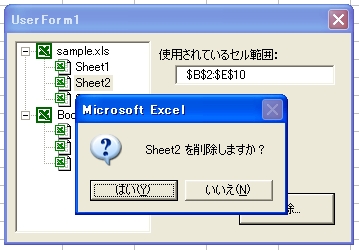
SelectedItemのChildrenが0より大きいということは「子がいる=親=ブック」ということですから、メッセージを選択して処理を中止します[*1]。
子と判断できたら、ブック名とシート名を変数に格納します[*2]。
「削除してもいいか?」と確認メッセージを表示し[*3]、[はい]ボタンがクリックされたら削除を実行します。そのとき、Excelの確認メッセージが表示されないようにDisplayAlertsにFalseを指定してからDeleteメソッドを実行します。処理が終わったらDisplayAlertsをTrueに戻すのも忘れてはいけません。VBAではプロシージャが終了するとDisplayAlertsやScreenUpdatingの値は元に戻るようになっていますが、正しく後始末をすることはプログラマの義務です。わずか1行の処理を面倒くさがるようでは、美しいマクロは書けません。
さて、うまく動作したと思ったのですが、1つ大きな問題があります。実際のブック上では正しく選択したシートを削除できたのですが、TreeViewコントロールの方には相変わらず削除したはずのシート名が表示されています。そう、Excelの状況とTreeViewコントロールは、別に連動しているわけではないのです。シートを削除して状態が変わったのですから、その新しい状態をTrreViewにも反映させてあげなければなりません。もう一度、ブックとシートの情報を読み込んであげましょう。
ブックとシートの取得はUserFormの初期化処理で行っていました。その部分を独立したプロシージャにして、UserFormの初期化処理と、今回の削除処理の最後でコールしてやります。
Private Sub UserForm_Initialize()
    With TreeView1
        .Indentation = 14
        .LabelEdit = tvwManual
        .BorderStyle = ccNone
        .HideSelection = False
        .LineStyle = tvwRootLines
        .ImageList = ImageList1
    End With
    Call ResetTreeView
End Sub

Private Sub CommandButton1_Click()
    Dim BookName As String, SheetName As String
    With TreeView1
        If .SelectedItem.Children > 0 Then
            MsgBox "削除するシートを選択してください", vbExclamation
            Exit Sub
        End If
        BookName = .SelectedItem.Parent
        SheetName = .SelectedItem
        If MsgBox(SheetName & " を削除しますか?", 36) = vbYes Then
            Application.DisplayAlerts = False
            Workbooks(BookName).Worksheets(SheetName).Delete
            Application.DisplayAlerts = True
        End If
    End With
    Call ResetTreeView
End Sub

Private Sub ResetTreeView()
    Dim wb, ws
    With TreeView1
        .Nodes.Clear
        For Each wb In Workbooks
            .Nodes.Add(Key:=wb.Name, Text:=wb.Name, Image:="book").Expanded = True
            For Each ws In wb.Worksheets
                .Nodes.Add Relative:=wb.Name, Relationship:=tvwChild, _
                           Key:=wb.Name & "!" & ws.Name, Text:=ws.Name, Image:="sheet"
            Next ws
        Next wb
        .Nodes(1).Selected = True
        TextBox1 = ""
    End With
End Sub
ツリーをリセットするためにResetTreeViewというプロシージャを作成しました。UserFormの初期化処理と削除処理の最後ではCallステートメントでResetTreeViewを呼び出しています。
ResetTreeViewは最初に書いたUserForm_Initializeの後半部分を流用します。ただし、少しだけ手直しをしています。その1つが「Nodes.Clear」です。これは「すべてのノードをツリーから削除する」命令です。シートを削除した後にツリーを再構築するには、それまで表示していたツリーをクリアしなければなりませんからね。
次の修正点は最後です。「Nodes(1).Selected = True」で明示的に先頭のノードが選択されている状態にしています。Selectedプロパティはノードが「選択されているか」を示すプロパティです。選択されていたらTrue、選択されていなかったらFalseとなります。このプロパティは値を設定することも可能で、Trueを設定することで選択状態にできます。本コンテンツでは解説しませんが、複数のノードを選択できるようにして、選択した複数のノードを一気に処理するような場合には、このSelectedプロパティを調べることになります。さらに、1番先頭のノードはブック名ですから、テキストボックスも空欄にしておきましょう。これで完成です。ただし、すべてのシートを削除しようとするとVBAのエラーになりますので、気になる方はこのへんの処理を追加してみてください。
(1)クリックされたノードの親(Parent)を調べる
(2)その親に子が何人いるか(Children)調べる
(3)1だったら自分しかいないので削除しない(できない)
のような流れになるでしょうか。
シート名を変更する
最後に、選択したシートの名前を変更できるようにしてみましょう。
ノードに表示されている文字列を、ユーザーが編集できるかどうかはTreeViewコントロールのLabelEditプロパティで指定します。今回の解説では、初期化処理でLabelEditプロパティにtvwManualという定数を指定しています。この定数は「編集はManual(手作業)で」という意味です。もう1つtvwAutomaticという定数も指定できるのですが、こちらは「Automatic(自動的)に」となります。tvwAutomaticを指定した場合、ユーザーはノードをクリックするだけで編集状態が開始されます。デスクトップに置いたアイコンの、ファイル名部分をクリックすると自動的に編集状態となって名前を書き換えられるようになりますよね。この状態がtvwAutomaticです。今回はLabelEditプロパティにtvwManualを設定していますので、ノードを編集するときはプログラムから編集状態にしてやらなければなりません。ノードを編集状態にするには、TreeViewコントロールのStartLabelEditメソッドを実行します。NodeオブジェクトのメソッドではなくTreeViewコントロールのメソッドですから混同しないでくださいね。実行すると、選択されているノードが編集状態になります。
ノードを編集状態にするトリガーは[F2]キーにしましょう。TreeViewのKeyUpイベント(でなくてもいいですけど)で[F2]キーを判定します。[F2]キーのKeyCodeは113ですので、次のようなコードになります。
Private Sub TreeView1_KeyUp(KeyCode As Integer, ByVal Shift As Integer)
    If KeyCode = 113 Then
        TreeView1.StartLabelEdit
    End If
End Sub
次に、ノードのラベルが編集されたら、実際にシートの名前を変更するわけですが、ここでも事前にエラーの対策を考えなければなりません。たとえば、すでに存在するシートと同じ名前を付けることはできません。また、シート名に使えない文字もあります。シート名のリネームは失敗することが多いのです。これらのエラーに対処するには、次のように考えます。
(1)新しい名前のシートがすでに存在していたらリネームしない
(2)リネームが失敗したら、そのシート名は使えない
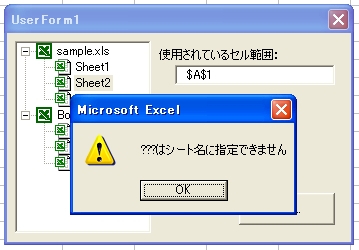
ブック内に存在するシートと同じ名前だったら、最初からリネームさせません。どうせエラーになるのがわかっているのですから。やっかいなのは「???」などシート名に設定できない文字列だった場合です。「???」という名前のシートは絶対に存在しませんので、とりあえずリネームにトライします。その後ですべてのシート名を調べて、指定した名前のシートが存在したら「リネームに成功=名前を使える」と判断します。この2段階のエラー対策を、TreeViewコントロールのAfterLabelEditイベントに記述します。
Private Sub TreeView1_AfterLabelEdit(Cancel As Integer, NewString As String)
    Dim BookName As String, SheetName As String, ws, flag As Boolean
    With TreeView1
        BookName = .SelectedItem.Parent
        SheetName = .SelectedItem
        ''同じ名前のシートが存在するか?
        For Each ws In Workbooks(BookName).Worksheets
            If ws.Name = NewString Then
                flag = True
                Exit For
            End If
        Next ws
        If flag Then
            MsgBox NewString & "はすでに存在します", vbExclamation
            Cancel = True
            Exit Sub
        End If
        ''実際のリネーム処理
        On Error Resume Next
        Workbooks(BookName).Worksheets(SheetName).Name = NewString
        ''リネームが成功したか?
        For Each ws In Workbooks(BookName).Worksheets
            If ws.Name = NewString Then
                flag = True
                Exit For
            End If
        Next ws
        ''失敗したら元に戻す
        If Not flag Then
            MsgBox NewString & "はシート名に指定できません", vbExclamation
            Cancel = True
        End If
    End With
End Sub
AfterLabelEditイベントは編集の終了後に発生します。ただし、まだ編集は完了していません。古いラベルはSelectedItemプロパティで取得できます。また、新しく入力したラベルは引数NewStringに格納されています。引数CancelにTrueを設定して処理を中止すると、ラベルは元の状態に戻ります。
最初のチェック「同じ名前のシートが存在するか?」で、同じ名前が見つかった場合は、引数CancelにTrueを設定して処理を中止します。続いて、実際にリネームしてから2つめのチェック「リネームが成功したか?」で、新しい名前のシートが存在するかを調べます。成功していたら存在するはずです。エラーで止まらないように、On Error Resume Nextも忘れてはいけません。もし存在していなかったらリネームに失敗したのですから、ラベルも元に戻します。