MS-DOSコマンドの標準出力を取得する
またもや「Excel VBAと関係ねぇじゃねーか!」と言われそうですが、今回はMS-DOSコマンドの標準出力を変数に取得する方法を解説します。これはもう、Excelとは関係ないVB系のネタなんですね。ただ実行環境がExcelってだけで(^^; ま、いーや書いちゃえ。MS-DOSって何のことだかわからない人は、自分で調べてください(^^; なお、ここではWindows XP Home Editionを例に解説します。
MS-DOSのコマンドには今でも便利に使えるものが多いですし、何よりネットワークを管理されている方は必須コマンドです。VBやVBAからMS-DOSコマンドを実行するときには、問題が2つあります。1つめはShell関数で起動できないことです。MS-DOSコマンドはいわゆるDOS窓で起動する仕組みになっていますので、Shell関数では起動できません。2つめの問題は、実行結果もDOS窓に出力されるということです。いわゆる標準出力ですね。この2つの問題をクリアできれば、MS-DOSコマンドを使ってかなりおもしろいことが可能です。
これら2つの問題は、WSH(Windows Scripting Host)で解決します。WSHのWshScriptExecオブジェクトが持つExecメソッドは、command.comやcmd.exeなどのコマンドシェルを実行できます。さらに実行結果の標準出力を取得することも可能です。さっそくやってみましょう。次のコードはC:\のファイル一覧を表示します。
Sub Sample1()
    Dim WSH, wExec, sCmd As String, Result As String
    Set WSH = CreateObject("WScript.Shell")         ''(1)
    sCmd = "dir C:\"                                ''(2)
    Set wExec = WSH.Exec("%ComSpec% /c " & sCmd)    ''(3)
    Do While wExec.Status = 0                       ''(4)
        DoEvents
    Loop
    Result = wExec.StdOut.ReadAll                   ''(5)
    MsgBox Result
    Set wExec = Nothing
    Set WSH = Nothing
End Sub
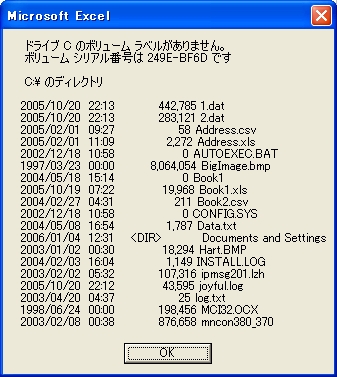
(1)でWSHへの参照を作ります。(2)が実行するMS-DOSコマンドです。引数まで指定してください。(3)でExecメソッドを実行しています。コマンドシェルは9x系と2000系で異なりますので%ComSpec%で自動判定させています。実行するとWshScriptExecオブジェクトを返しますので、変数に格納します。MS-DOSコマンドは完了まで時間がかかることがありますので(4)のようにループで完了を待ちます。完了したかどうかはWshScriptExecオブジェクトのStatusプロパティで判定します。MS-DOSコマンドの標準出力はStdOutプロパティで取得できますので、すべてを変数Resultに格納しました。最後にオブジェクト変数を解放しておしまいです。
この実行結果は、DOS窓でMS-DOSコマンドを実行したのと同じです。
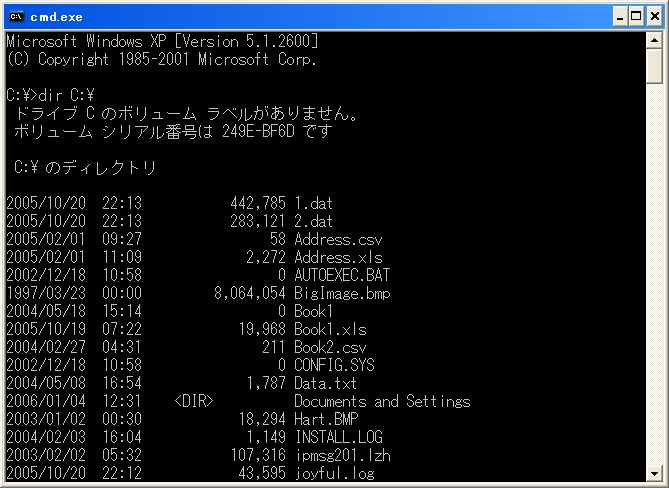
上記のコードを実行するとわかりますが、一度DOS窓が表示されます。それを承知の上で使ってください。
さて、上記のコードではファイルの一覧を返すdirコマンドを使いましたが、dirコマンドには豊富なオプションが用意されています。すべてのオプションを知りたいときは、DOS窓で「dir /?」と打ってください。次のコードは、C:\にあるフォルダのうち、非表示ではないフォルダ名だけを、降順で取得して配列に格納します。配列への分割はSplit関数を使っています。Split関数に関しては「Split関数で文字列を区切る」をご覧ください。
Sub Sample2()
    Dim WSH, wExec, sCmd As String, Result As String, tmp, i As Long
    Set WSH = CreateObject("WScript.Shell")
    sCmd = "dir C:\ /b /aD-H /o-N"
    Set wExec = WSH.Exec("%ComSpec% /c " & sCmd)
    Do While wExec.Status = 0
        DoEvents
    Loop
    Result = wExec.StdOut.ReadAll
    tmp = Split(Result, vbCrLf)
    For i = 0 To UBound(tmp)
        Cells(i + 1, 1) = tmp(i)
    Next i
    Set wExec = Nothing
    Set WSH = Nothing
End Sub
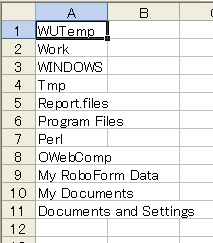
これと同じことをFileSystemObjectなどでやるのは、けっこう手間ですよね。
あとは工夫しだいです。最後にいくつかサンプルを紹介しましょう。次のコードは、C:\tmpのフォルダ構造をツリー形式で取得します。C:\tmpにはあらかじめいくつかのサブフォルダを作ってあります。
Sub Sample3()
    Dim WSH, wExec, sCmd As String, Result As String, tmp, buf As String, i As Long
    Set WSH = CreateObject("WScript.Shell")
    sCmd = "tree C:\tmp"
    Set wExec = WSH.Exec("%ComSpec% /c " & sCmd)
    Do While wExec.Status = 0
        DoEvents
    Loop
    Result = wExec.StdOut.ReadAll
    tmp = Split(Result, vbCrLf)
    For i = 2 To UBound(tmp)        ''3行目以降を変数に格納します
        buf = buf & tmp(i) & vbCrLf
    Next i
    MsgBox buf
    Set wExec = Nothing
    Set WSH = Nothing
End Sub
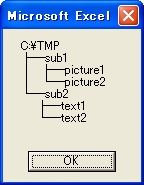
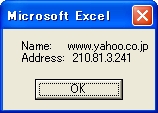
次のコードは、DNSサーバーでwww.yahoo.co.jpのIPアドレスを調べます。
Sub Sample4()
    Dim WSH, wExec, sCmd As String, Result As String, tmp, buf As String, i As Long
    Set WSH = CreateObject("WScript.Shell")
    sCmd = "nslookup www.yahoo.co.jp"
    Set wExec = WSH.Exec("%ComSpec% /c " & sCmd)
    Do While wExec.Status = 0
        DoEvents
    Loop
    Result = wExec.StdOut.ReadAll
    tmp = Split(Result, vbCrLf)
    For i = 0 To UBound(tmp)
        If Left(tmp(i), 5) = "Name:" Then
            buf = tmp(i) & vbCrLf & tmp(i + 1)
        End If
    Next i
    MsgBox buf
    Set wExec = Nothing
    Set WSH = Nothing
End Sub